Request for Funds (RFF) – User guide
1. How to initiate a Request for Funds?
1.1 General information
To initiate a RFF, fill out the EDH form Appel de fonds externes (RFF) / Request For External Funds (RFF). Fields with an asterisk (*) are mandatory and must be filled in.
- Please note that each RFF must be supported by a justification explaining the reason for issuing an RFF invoice (e.g. KR contract number, annual contribution for an experiment…). All supporting documents that seem necessary can be attached to the RFF. Be aware that if the client needs to receive these documents, they will have to be sent separately from the invoice by the creator.
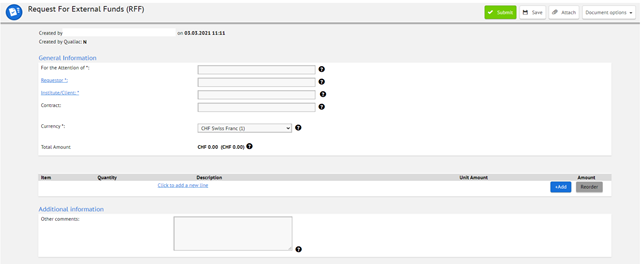
- If the RFF is linked to a contract (e.g. KRxxxx), please fill in the reference even if it is not a mandatory field.
- Search for the Institute/Client by clicking on the blue hyperlink to the left and select “More options”.
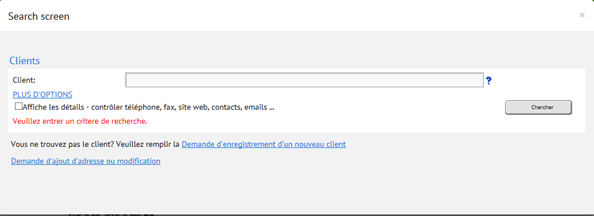
If the Institute/Client is not registered, please follow the hyperlinks on the search screen to register or modify an existing entity: fill in the request form which will be sent to client.dbsupport@cern.ch.You can also ask to create a new address, or to modify the existing address.
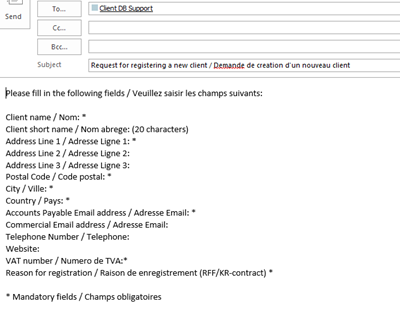
Once you have received by e-mail the information that the Institute/Client has been created (usually the next day), you can go ahead with the next steps in creating your RFF.
- Unless a special written agreement exists, all RFFs should be issued in Swiss Francs. If the amount is in another currency, a conversion in Swiss Francs is automatically done with the currency rate of the day.
- Under the “Line item editor” fields, note that the “short description” will be shown in CET (CERN Expenditure Tracker), while the “reference” and “detailed description” will be printed on the invoice.
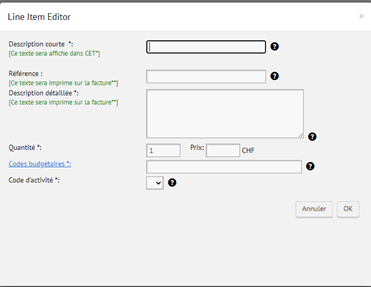
- Assignment of the EDH fields on the printed invoice:
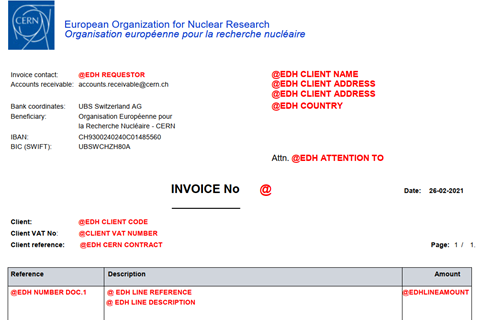
The budget code is in the form Txxxxxx for third-party accounts and in the form 12xxx for CERN budget codes. Even if the list includes all budget codes, you have to select a revenue budget code (cf. next paragraph for more information about CERN revenue budget codes, all third-party accounts are revenue budget codes).
The activity code will be assigned automatically or shall be chosen in the drop-down list.
- Invoices are sent electronically in pdf format to the creator and the requestor of the RFF document.
If the invoice shall be sent automatically to other e-mail addresses such as the Client accounts payable service, they have to be provided under the “Additional information” field. - If no e-mail address is entered here for a CERN budget code, an error message will appear.
The creator can also add other comments such as information related to the sending of the invoice for Accounts Receivable or related to budget allocations for FAP-FPC.
The information in this field will not be visible in CET, nor on the invoice itself.

- Once the EDH document has been saved and sent, it will be routed for approval to:
- the requestor,
- signature holder(s) of the concerned budget codes(s),
- DPO of the department for CERN budget codes, and
- FAP for financial control.
- The date of the invoice will be the date of validation of the EDH document. Around the end of the year, an additional field is available to select between previous year or current year to ensure that the invoice is issued with the appropriate accounting date.
- As mentioned earlier, supportive documents will not be included in the automatic invoice e-mail.
By not adding client contact e-mails in the RFFs, creators on third-party accounts have the choice to forward the invoice themselves, together with a personalised e-mail, an enclosed letter or other supportive documents.
On CERN codes, invoices are always sent automatically to the client e-mail address noted in the field “additional information” in the EDH document. Therefore, supportive documents, if required, have to be sent separately.
1.2 CERN budget codes for departmental revenue
Standard policy on central revenue budget codes / activity codes:
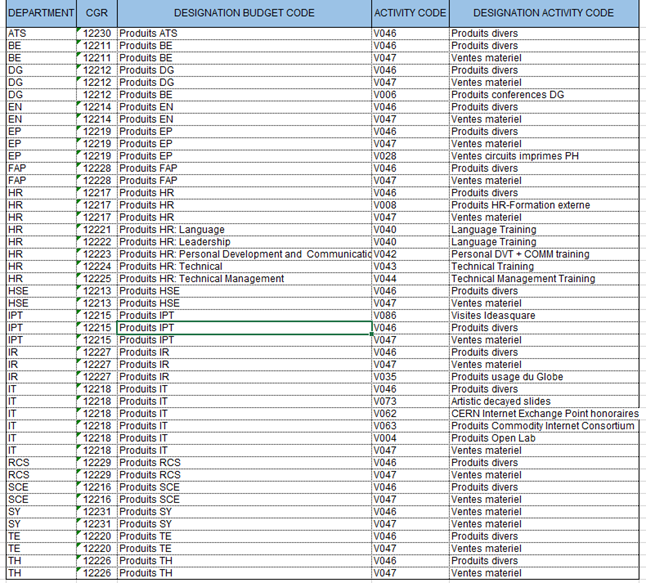
Except for revenues coming from re-billing contracts / mixed flow budget codes / conference budget codes…, revenues from departments are registered on the central budget code of each department, and then extra budget is attributed by FAP-FPC either on explicit demand of departments, or “semi-automatically” twice a year (October and February).
When filling the RFF document, indicate in the “Line Item Editor” field the central budget code of the concerned department where the revenue will be recorded, and then choose on a drop-down list the correct activity code.
Here is a non-exhaustive list of central revenue budget codes and corresponding activity codes (does not include specific budget codes like MFBC, conferences codes, re-billing codes…):
For more information about CERN budget codes, please contact General.Accounting@cern.ch.
2. FAQs
How do I cancel an EDH RFF document that has been fully approved?
Once the RFF is fully approved, an invoice is automatically created.
In order to cancel the invoice, a credit note has to be issued. For that, you can clone the EDH document, negate the amounts to cancel the initial RFF, and indicate in the comments which invoice should be cancelled: a credit note will be generated and will be associated to the initial invoice.
Should you have any question about the EDH document Request for Funds, please contact General.Accounting@cern.ch for RFFs concerning CERN budget codes, or accounts.receivable@cern.ch for RFFs concerning third-party accounts.
Should you have any question about the clients database, please contact client.dbsupport@cern.ch.