Procedure to register and extend an External in the PAD application
By submitting a new External in the PAD application, the secretariat or service responsible must pay particular attention to the autocomplete process in their browser. Indeed, their browser will use this option to autocomplete the selected field by terms already used in the application.
As an example, if the secretariat or service edits the field “Contact person for External” and clicks on Enter, their browser may edit the information by submitting the name and first name of the External. The new External will then become their own guarantor with their organic unit.
To disable this option in your browser, the following quick steps may be followed: How to enable or disable autocomplete in a web browser.
1. Registration of an External
Registration is completed in the PAD application by the departmental secretariat (DAO) or the service responsible.
Based on the information given in the completed and signed registration form, the secretariat registers the External person using the PAD application – “Person History” screen.
When doing so, the secretariat should carefully check whether the person is already registered in the database in order to avoid the creation of duplicates.
- If the person already exists in the database, only the information regarding the External period should be completed in PAD, in the pre-filled green box.
Mandatory information:
- Contact person for External: Only a staff member can be CERN guarantor.
- Reason: Please respect the instructions in brackets and do not select a reason that only certain services or departments are permitted to use.
- Start of External period
- End of External period: Please observe the maximum duration of registration as determined by the reason for the person coming to CERN (cf the duration indicated in the table of the procedure Externals).
- If the person is not yet in the database, a new registration including the complete set of information must be performed:
Mandatory information:
- From: Enter the date of birth.
- Title
- Lastname and Firstname: The defined rules are to be followed. If applicable the information on the passport should be entered. You are strongly advised to request to see a passport before entering the name of the person.
- Date of birth
- Sex
- Nationality
- Contact person for External: Only a staff member can be a CERN guarantor.
- Reason
- Start of External period
- End of External period: Please observe the maximum duration of registration, as determined by the reason for the person coming to CERN (cf the duration mentioned in the table of the procedure Externals).
Optional information:
If mentioned on the form, the following information can also be entered:
- Middle name (second first name) or Previous name (maiden name) : often used if the person has a quite common lastname.
- Second nationality
- E-mail and work telephone
- Comments: You can enter more details here about the reason for the person’s stay.
2. Extension of an External
Some External categories may be extended.
Registration of the extension is completed in the PAD application by the departmental secretariat (DAO) or the service responsible.
Based on the information given in the completed and signed registration form, the secretariat registers the External person extension using the PAD application – “Person History” screen.
To avoid any interruption of the services (for example, computing account or CERN access card), it is important that the registration of the External remains continuous:
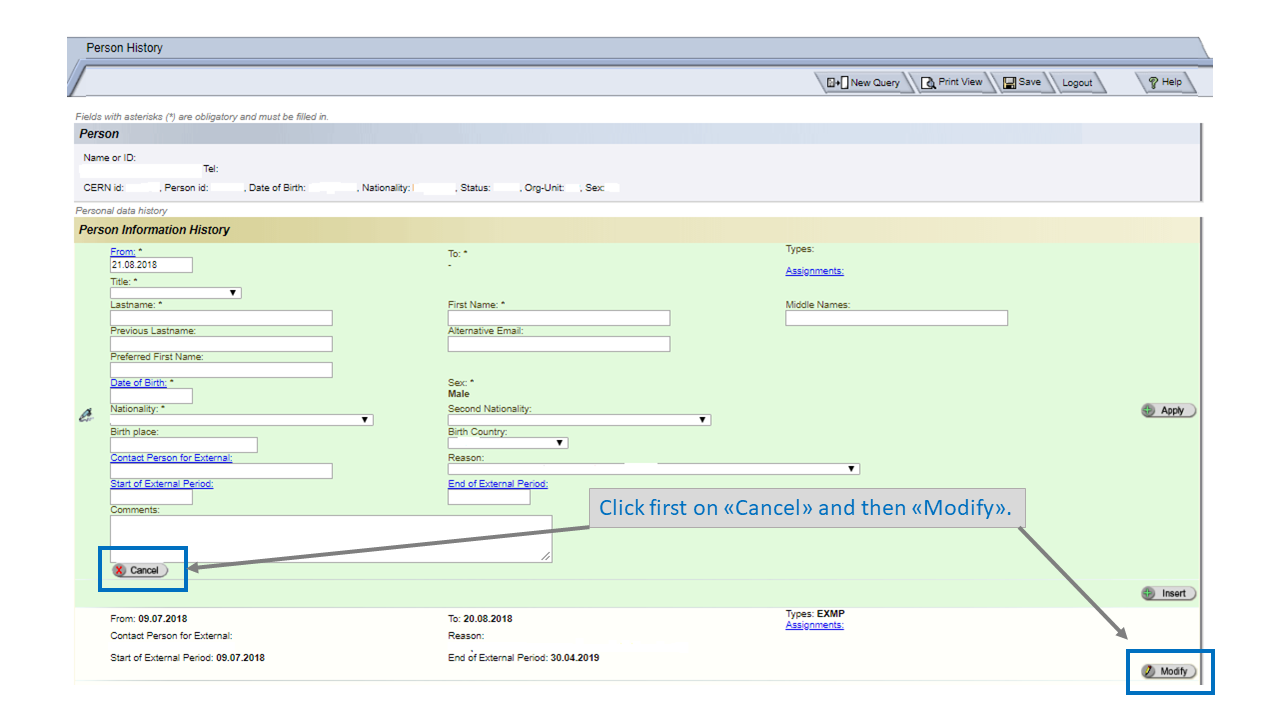
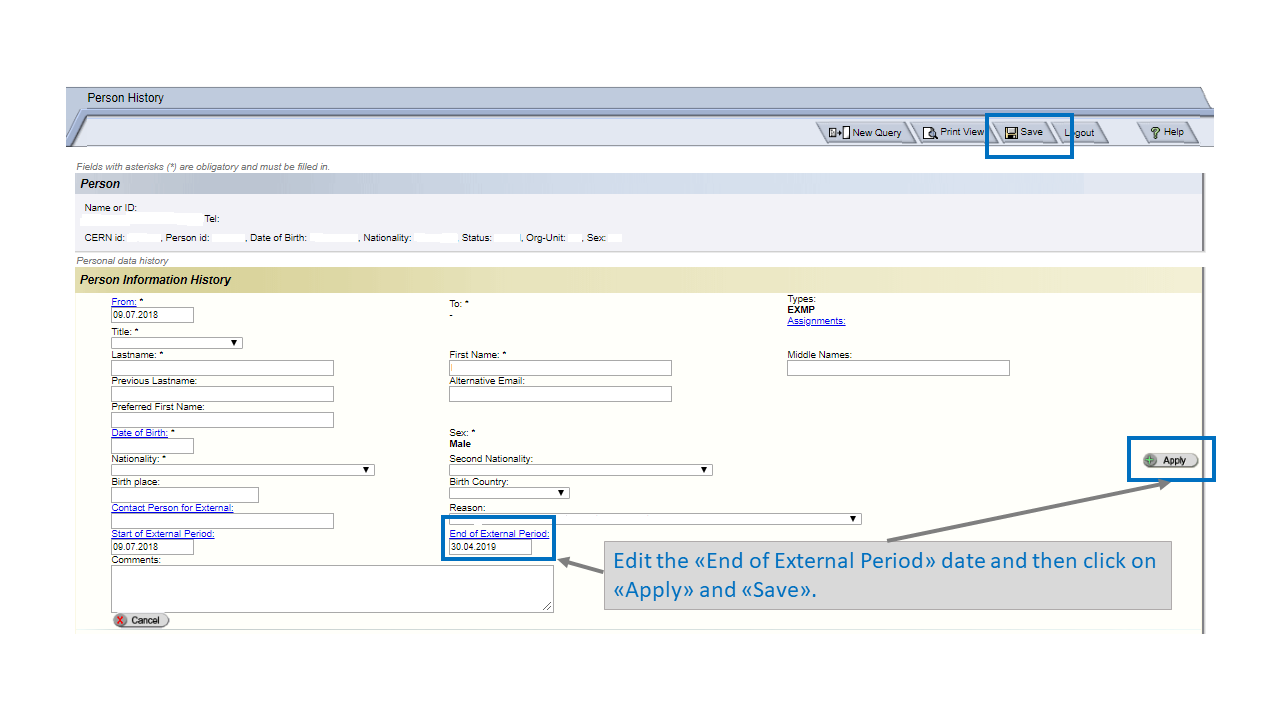
Search for the concerned person, close the green box that opens automatically on the current date (Cancel), then modify (Modify) the line containing the initial registration by replacing in End of External period the initial end date with the new end date, while observing the maximum registration duration of the Externals as determined by their reason.
Illustration of how to enter an extension of an External in the PAD application: