5.7.2 What should I do if I changed supervisor during the reference period?
- 1st option: The supervisor signs the MERIT form and selects “Forward with my rights”. This sends the MERIT form to the person selected with the SAME RIGHTS as the person who has signed the document. For this reason, it is important that it is the supervisor who sends the document with their rights (if the staff member tries to send with rights, the person receiving the MERIT form will have the same rights as the staff member and will, therefore, not be able to edit the form). The previous supervisor can edit the document as needed, including adding their evaluation, before signing and sending back to the new supervisor to complete the MERIT form.
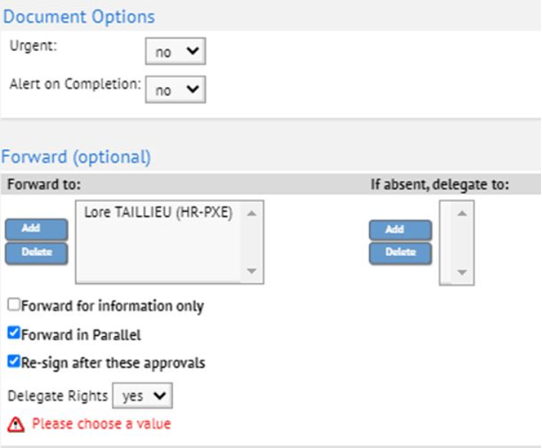
Please note that if the MERIT form was created by the supervisor, they can only “forward with my rights” at the supervisor signature phase. As the creator of the form, the supervisor receives the MERIT form twice for signature; the first time as creator of the document; the second time as supervisor. The “forward with my rights” should only be done at the 2nd signature, i.e. signature as supervisor.
- 2nd option: The supervisor contacts the previous supervisor outside of the MERIT form (e.g. by email), to ask for their input into the results achieved and evaluation. This information is then integrated by the new supervisor into the MERIT form.
HR recommends that the first solution is used, as it is more transparent and provides better traceability.