Table of contents
General
Procedure
1. The contractor's representative
1.1 Nomination of the contractor's representative
1.2 Registration of the contractor's representative
1.3 Training of the contractor's representative
2. Registration of contactor's personnel prior to arrival on site
2.1 Start of pre-registration (minimum 5 working days before arrival)
2.2 The Foreseeable Preponderant Share of the contract (4P)
2.3 Verification and registration of the file
2.4 Specific case of the subcontractor
2.5 Specific case of contractors' personnel working remotely
3. Preparation for the arrival of contractor's personnel
3.1 Creation of the computing account
4. Arrival at CERN and finalisation of registration
5. Monitoring of registrations via the dashboard
6. Authorisation to work outside normal working hours and days
6.3 Deleting a current authorisation
7. Specific case of the year-end closure
8.1 End of mission before the projected end date
8.2 End of mission on the scheduled end date
8.3 Expiry date of identity documents
9. Withdrawal of the access card
The CERN Community Support Center (CCSC) is responsible for the overall management of contractor's personnel files, from pre-registration to termination of affiliation, issuance of CERN access cards, registration of vehicles and support to individuals in their administrative procedures (activation of computing accounts, practical information, etc.) in coordination with the IPT department.
For more details on how the CERN Community Support Centre works, please refer to Knowledge Base Article KB0009599.
Anyone working at CERN for a contractor or in the framework of a work order must comply with the rules in force in the Organization with the rules in force in the Organization and in the Host States. The document “Working on the CERN Site” and the CERN technical contact of the contract provide the relevant information in this regard.
1. The contractor's representative
1.1 Nomination of the contractor's representative
Each firm appoints a contractor's representative. This person is responsible for:
- registering the personnel assigned to work on the CERN Site;
- keeping all information relating to contractor's personnel up to date for the duration of the contract;
- informing CERN of any relevant changes;
- requesting the termination of affiliation to the CERN Community Support Center when the assignment comes to end.
1.2 Registration of the contractor's representative
The “Registration of contractor's and temporary personnel - guidelines” page has been set up to guide contractor's representatives in the following scenarios:
- their own registration with CERN;
- obtaining the necessary access to create pre-registration forms (PREGRO) and manage their personnel's files.
1.3 Training of the contractor's representative
Once registered, the contractor's representative can participate in training sessions organised by the CERN Community Support Centre.
These training sessions provide an overview of:
- creating the formulaire de pré-enregistrement pour les contractants / Pre-registration form for Contractors (PREGRO) ;
- using the dashboard to follow up on contactor's personnel;
- other tools provided by CERN, such as the CERN Service Portal and the CERN Training Catalogue (Learning Hub).
2. Registration of contractor's personnel prior to arrival on site
2.1 Start of pre-registration (minimum 5 working days before arrival)
Pre-registration must be initiated at least 5 working days prior to the arrival of contractor's personnel in order to allow for the synchronisation of the various information in the tools used. The contractor's representative or the back-up creates the formulaire de pré-enregistrement pour les contractants / Pre-registration form for Contractors (PREGRO) by following the instructions provided in the EDH document's online help.
The contractor's representative uploads scanned copies of the following documents to the formulaire de pré-enregistrement pour les contractants / Pre-registration form for Contractors (PREGRO):
- a valid identity document (identity card or passport);
- the acknowledgement of receipt of the secondment declaration, where applicable;
- the work permit for the host state concerned, where applicable.
Registration with CERN does not confer any work permit in the host states: the contractor therefore remains at all times responsible for its legal and regulatory obligations towards the relevant authorities, particularly with regard to the posted of foreign workers.
Contractors are invited to refer to the documents "Firms not established in France bringing in personnel to work on the French part of the site" and "CERN - Posted workers – Implementation of the principle of foreseeable preponderant share in Switzerland".
The information provided by CERN regarding applicable national regulations is for guidance only and is subject to change. It is the responsibility of contractors to consult the relevant authorities directly (the French Labour Inspectorate, OCIRT in Switzerland) or seek legal advice in case of doubt.
2.2 The Foreseeable Preponderant Share of the contract (4P)
The services described in the contract are carried out either:
- on a single national territory (the Swiss or the French part of the CERN site);
- on both the French part and the Swiss part of the CERN site.
For each contract, the “foreseeable preponderant share of the services to be provided” (known in French as “4P”) is indicated in the technical specification of the invitation to tender or the price enquiry. The foreseeable preponderant share is defined in accordance with the agreement between the Government of the French Republic, the Swiss Federal Council and the European Organization for Nuclear Research (CERN) on the law applicable to contractors providing services of a transnational nature on the Organization’s site, as well as the Amending Protocol to the Agreement between the Government of the French Republic and the Swiss Federal Council concerning the extension into French territory of the CERN site, concluded on 13 September 1965. For more information, see the Procurement Service website: Law applicable to contractors’ personnel.
Procedures to be followed with the relevant authorities in the host state, depending on the applicable 4P:
4P French – applicable French law
| Nationality of the contractor and subcontractors | Employee's nationality | Procedures |
|---|---|---|
|
Third country (outside European Economic Area (EEA)/swiss) |
Third country | Complete the necessary procedures for secondment (SIPSI) and apply for a work permit. |
| EEA or swiss | Complete the necessary procedures for secondment (SIPSI). | |
| EEA/swiss | Third country | Complete the necessary procedures for secondment (N.B. The employee must hold a valid work permit, visa or residence permit, depending on the duration of the assignment). |
| EEA or swiss | Complete the necessary procedures for secondment (SIPSI). | |
| French | Third country |
|
| EEA or swiss | No document required. |
If you have any questions regarding the secondment declaration, please contact the Labour Inspectorate:
Phone: 04 74 45 91 28
E-mail: ddets-uc1@ain.gouv.fr
Address:
DDETS de l’Ain
34 avenue des Belges
01000 Bourg en Bresse
4P Switzerland – applicable Swiss law
| Nationality of the contractor and subcontractors | Employee's nationality | Procedures |
|---|---|---|
| Third country | EEA/Third country | Apply for a permit as described in the memorandum "CERN - Posted workers’" at least six weeks before the start of the contract |
| EEA | EEA/Third country |
|
| Swiss | EU/European Free Trade Association (EFTA)/Third country |
Hold a valid Swiss work permit. |
For Switzerland, please contact the Office cantonal de l’inspection et des relations du travail (OCIRT):
E-mail: reception.ocirt@etat.ge.ch
Website: https://www.ge.ch/detacher-du-personnel-offrir-ses-services-geneve.
Summary of the steps to follow
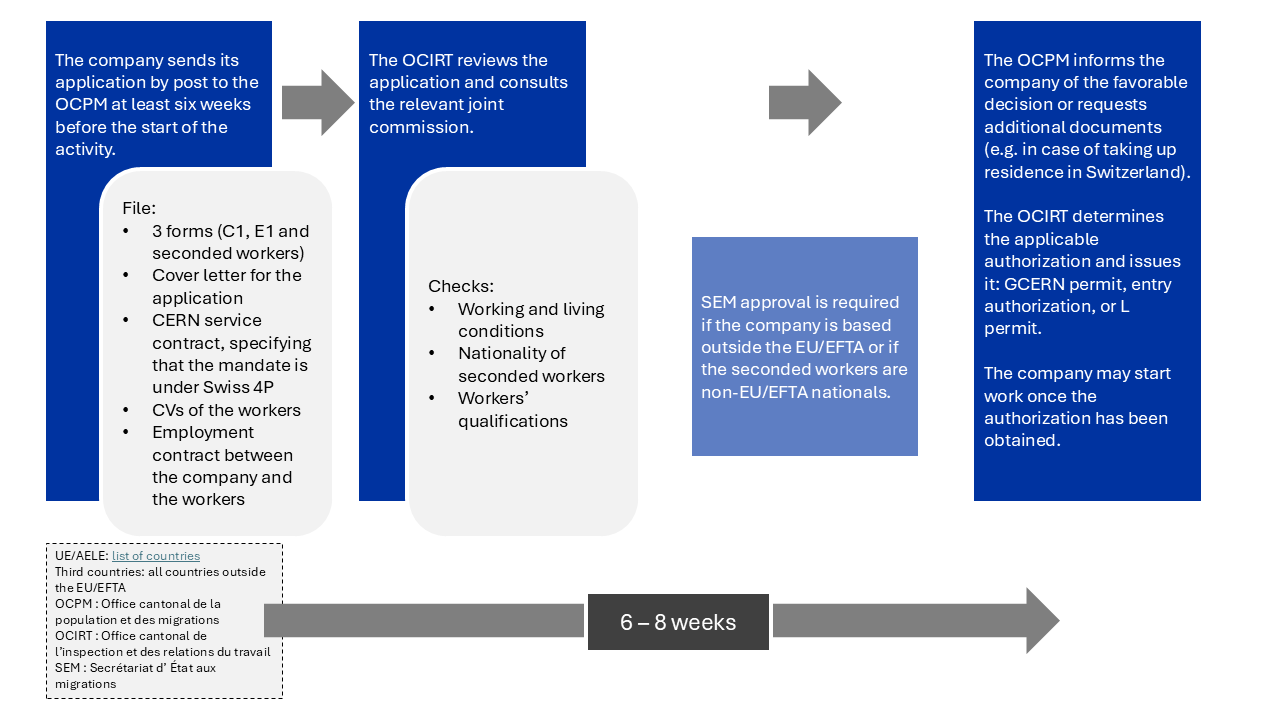
2.3 Verification and registration of the file
The CERN Community Support Centre [Building 33] checks the request received via EDH and informs the contractor of its progress:
- if the request is rejected, the contractor is informed of the documents required to complete the request;
- if the request is validated, an automatic e-mail is sent to the contractor's representative, the registered person and the CERN technical contact indicating that the employee can proceed to the CERN Community Support Centre [Building 33] with a valid identity document to finalise the file.
2.4 Specific case of the subcontractor
If the contractor is using a subcontractor, the latter must have been declared in contract in advance in order for it to be available for selection in EDH. If the subcontractor does not appear in the list, the contractor must provide the CERN technical contact responsible for the contract with the subcontractor’s full contact details so that the latter may contact the Procurement Service to request the necessary validation and registration.
2.5 Specific case of the contractor's personnel working remotely
Some contracts or work orders provide for the possibility of personnel working exclusively remotely. In such cases, the contractor's representative must communicate the following information to the CERN Community Support Centre via the formulaire de pré-enregistrement pour les contractants / Pre-registration form for Contractors (PREGRO):
- the reference number of the contract or order;
- identity documents of the person concerned.
This type of registration for the purposes of teleworking does not under any circumstances allow a CERN access card to be issued.
3. Preparation for the arrival of contractor's personnel
Once the contractor's personnel has been registered in the CERN systems, the representative of the contractor can organise the arrival and:
- submit, via the Service Portal, the ID photo, indicating the name, firstname, CERN ID of the registered contractor's personnel and the contract reference or send it to Access.registration@cern.ch so that the access card can be prepared;
- register the vehicle if necessary (refer to section 3.3);
- inform the contractor's personnel that the computing account has been activated and that the mandatory training courses must be completed.
3.1 Creation of the computing account
Contractor's personnel may be granted a computing account if their activities justify it. For more details on the steps involved in activating a computing account, please refer to the procedure "Automatic activation of the computing account".
In addition, the contractor's personnel must follow the computer security course within five days from the date of validation of the computing account.
3.2 Mandatory trainings
Contractor's personnel must follow a number of mandatory training courses via the CERN Training Catalogue (Learning Hub).
The applicable access and working conditions are laid down in the Working on the CERN site document.
3.3 Registration of vehicles
3.3.1 Professional vehicles
To enable correct traceability, it is recommended that the contractor's representatives register the professional vehicles used by their personnel in their name via the application https://vehicles.cern.ch/vehicles/.
When registering, select the “ Enterprise Car ” vehicle type for vehicles associated with a contractor. This selection is essential for the Site Security Service to be able to correctly track the vehicles used by the contractors' personnel at CERN.
When contractor's personnel are registered for a short-term mission or as part of a specific order, the contact person for the contractor can register the vehicle in order to allow access to the site.
It is necessary to ensure that the information is up to date to avoid any problems during access.
3.3.2 Personal vehicles
The contractor's personnel may register their personal vehicles themselves via the application https://vehicles.cern.ch/vehicles/.
If they don't have a computing account, they can send a copy of the vehicle registration document to Access.registration@cern.ch so that the CERN Community Support Centre can register it before their arrival.
For more details, refer to the procedure "Registration of vehicles".
Holders of a red “E” or orange “P” CERN card may activate only one vehicle from the list of vehicles registered in their name.
4. Arrival at CERN and finalisation of registration
Once the order or contract has been signed by CERN and the file has been validated by the CERN Community Support Centre [Building 33], the contractor's personnel (with the exception of contractor's personnel working remotely) must report to the CERN Community Support Centre [Building 33] with the original documents that were submitted via the EDH form, as well as valid ID and their vehicle registration document if they wish to access the site by car. For more details on vehicle registration, please refer to paragraph 3.3. Vehicle registration of this procedure.
The contractor may start work after ensuring that any permits required by the host state have been obtained in advance.
5. Monitoring of registrations via the dashboard
The contractor's dashboard is a tool designed to facilitate the monitoring and management of contractor's personnel at CERN. Through the dashboard, authorised persons can:
- view the status of contractors' and temporary personnel;
- access details of their associated contract or order, the name of the contractor, and the validity of the documents;
- monitor the period of mission of contractor's personnel at CERN.
5.1 Access the dashboard
Access to the contractor's dashboard is restricted to:
- CERN Technical contacts, persons with the role TECHNICAL_CONT;
- CERN Coordinators (as listed in the formulaire de pré-enregistrement pour les contractants / Pre-registration form for Contractors (PREGRO)), persons who can see the contractors whom they monitor;
- administrative personnel with the PRT_RO_USER role who have the authority to register contractor's personnel for a contract or an order.
5.2 Use of the dashboard
The contractor's dashboard is designed for contract or order managers to ensure that all contractors' data is accurate and up to date. In particular, it should be used to:
- monitor and verify the active affiliation of contractors' personnel with CERN;
- ensure the validity of required documents;
- maintain accurate data on the registration and affiliation of contractors' personnel.
6. Authorisation to work outside normal working hours and days
For any work performed outside CERN's normal working hours, defined as 7:00 a.m. to 7:00 p.m., Monday to Friday, the document "Autorisation exceptionnelle de travail (AET)" must be obtained in advance via the CERN technical manager responsible for the contract. Anyone with a CERN computing account can create a document "Autorisation exceptionnelle de travail (AET)" via EDH.
6.1 Initial request
The person initiates the document "Autorisation exceptionnelle de travail (AET)" via EDH by selecting the option "New authorisation", entering the names and first names of the persons concerned, the validity dates of the request (maximum 1 year), the mandatory reason and the optional indication of work location(s). The contract reference will appear automatically based on the information submitted in Qualiac. One request must be created per contract. However, it is possible to clone an existing document to facilitate the processing of requests.
If one or more authorisations are already valid for a person, the EDH document displays them. The person may submit several requests for different periods; however, two authorisations cannot cover the same period.
Once submitted, the EDH document is routed as follows:
-
In the case of an order: it is sent to the technical responsible of the DAI, who approves or rejects it.
-
In the case of a contract: the request is first sent to the CERN technical contact, who verifies and, if necessary, modifies the information relating to the contract manager. It is then sent to the contract manager for approval via a link (token) sent by email from EDH. The person may approve or reject the request. If the contract manager has not approved the request within two days, it is automatically returned to the CERN technical contact. The CERN technical contact may then restart the approval process and, if necessary, correct the contact details of the contract manager. When no contract manager is registered in Qualiac, the IPT department is automatically informed.
At the end of the routing process, the person concerned are assigned the AUTH_AET role, which can be viewed via the Roles application (role valid on the dates mentioned in the authorisation request). The ADaMS application can then be used to display this authorisation.
Members of the contractor's personnel can then access to the site by presenting their access card to the security guard at Entrance B.
6.2 Exceptional cases
-
Bypassing the contractor's contract manager approval in EDH: the CERN technical contact may bypass the contractor's contract manager approval step in EDH by selecting the dedicated checkbox and adding a comment confirming that the contractor's approval has been obtained beforehand.
-
Urgent AET: when an urgent request needs to be created due to unforeseen work or last-minute change in personnel, the request must be submitted to the Guards Service (CSA) by email at access.surveillance@cern.ch or by telephone at +41 22 76 76666. The CSA will create and approve the AET for the night or weekend concerned. Behond this period, it will be the requester's responsibility to regularize the AET by following the standard procedure.
6.3 Deleting a current authorization
The technical responsible, the CERN contract manager or the Guards Service create a document "Autorisation exceptionnelle de travail (AET)" in EDH and search for the person concerned. The EDH document then displays the authorisation(s) already validated for that person, with the option to keep or delete them.
No approval routing is set up. The suppression request is automatically injected into the Roles application and the AUTH_AET role is deleted on the effective date of the document.
7. Specific case of the year-end closure
If the contractor's personnel need to access the CERN site during the end-of-year closure, they must take into account the following conditions:
8. End of mission
The contractor shall return access cards to the CERN Community Support Centre [Building 33] at the end of the assignment of the contractor’s and subcontractors’ personnel on the CERN site.
8.1 End of mission before the projected end date
When the contractor's personnel mission at CERN ends before the projected end date, the contractor's representative or the contractor’s manager must ensure that the contractor personnel’s affiliation with CERN is terminated.
8.2 End of mission on the scheduled end date
If the contractor's personnel mission ends on the projected end date, the affiliation will be automatically terminated.
8.3 Expiry date of identity documents
If the contractor personnel's documents (identity document, residence or work permit, etc.) expire before the projected mission end date, the affiliation with CERN will also be automatically terminated.
9. Withdrawal of the access card
Non-compliance with the rules applicable on the CERN Site can lead to the withdrawal of the access card and thus of the authorisation to enter the CERN Site and / or the withdrawal of the right to enter with a vehicle, without compensation by CERN on this basis.
The Procurement Service must be involved before any action and/or sanctions are taken.
- The authorization to work documents must be issued before the closure,
- The authorization to work documents for 2025 end on December 19th 2025,
- The authorization to work documents for 2026 start on December 20th 2025, and cannot extend beyond December 18th 2026.
- No access cards can be issued during the closure.
| No revision | Modifications | Approved |
|---|---|---|
| 1 | New paragraph 3 about the Authorisation to work outside normal working hours and days | 03.12.2018 |
| 2 | Clarification section c. of the table. | 29.04.2019 |
| 3 | Addition of the contact for secondment formalities. | 24.11.2021 |
| 4 | Addition of the new EDH document formulaire de pré-enregistrement pour les contractants / Pre-registration form for Contractors (PREGRO). | 19.06.2024 |
| 5 | Services from the building 55 are transferred to the CERN Community Support Centre (building 33) on the 1st of August 2024. | 31.07.2024 |
| 6 | Procedure revised by the services in charge. | 18.10.2024 |
| 7 | New paragraph 3. Registration of vehicles. | 21.10.2024 |
| 8 | Update of paragraph 3. | 08.11.2024 |
| 9 | The contractor's representative(s) can use either EDH or PRT to pre-register their personnel. Reminder concerning the mandatory online trainings to access the CERN site. | 08.11.2024 |
| 10 | Updated table of documents to be provided. | 12.11.2024 |
| 11 | Update of paragraph 4 with the specific case of the year-end closure. | 19.11.2024 |
| 12 | New paragraph 3. Follow up of the registrations through the dashboard. | 13.03.2025 |
| 13 | New paragraph 6. End of mission. | 27.03.2025 |
| 14 | Modification of paragraph 2. Registration with the mandatory trainings via the CERN Learning Hub and new help for the use of the CERN Contractors Dashboard. | 01.04.2025 |
| 15 | Modification of paragraph 2. Registration: The special case is about working remotely. | 05.05.2025 |
| 16 | PRT is decomissioned since the 1st of September. | 01.09.2025 |
| 17 | Modification of paragraph 2 to specify the documents to be provided on the first day. | 31.10.2025 |
| 18 | Revision of the procedure by the services in charge to clarify the information for the ENTCs. | 17.12.2025 |
| 19 | The document "Autorisation exceptionnelle de travail (AET)" in EDH replaces the paper form "Avis d'exécution de travaux en dehors de la plage horaire admise comme ""horaire normal"". | 05.05.2026 |
| 20 | Procedure fully revised by the services in charge. | 15.05.2026 |
| 21 | Update of paragraph 6: It is now possible to create an AET document for multiple people, provided they are associated with the same contract (previously, one request per person was required). The routing and order of the document’s approval workflow have also been revised. | 21.07.2026 |
| 22 | Update of paragraph 6.2 : Exceptional cases | 13.08.2026 |
| 23 | Update of the section "Urgent AET". | 27.08.2026 |